This article outlines:
- What duplicate assets are in the context of Lifecycle Manager
- The steps you can take to ensure that the data in your integrated tools is consistent
What are duplicate assets?
- Duplicate assets in Lifecycle Manager are multiple records for the same hardware asset syncing from the same integration.
- Duplicate assets in Lifecycle Manager are not single records for the same asset syncing from different integrations - this is an expected part of data syncing and shouldn't affect total asset count. See: An ideal Lifecycle Manager integration setup
Do I need to resolve duplicate assets?
- Not all Duplicate Assets are problematic and need to be resolved.
- As we group identified duplicates together into a single asset record and prioritize data from the most recently created duplicate record, duplicate assets don't affect your asset count and are generally not a major problem for your data.
- That said, duplicates can indicate poor data quality across your systems and sometimes create conflicts in our app, so it's a good idea to regularly review your duplicates and resolve them if needed.
- For more detailed information on duplicate assets, please see: About duplicate assets in Lifecycle Manager
Permissions
Who can use this feature?
- Lifecycle Manager users with Manage Sync Settings permissions.
What you'll need
- Access to delete/archive records in your integrated tools.
Resolving duplicate assets
Download the Duplicate Hardware Assets Spreadsheet
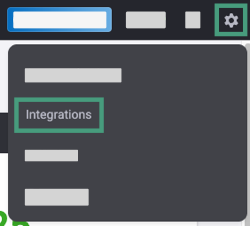
- Hover over the Settings icon in the upper right of Lifecycle Manager.
- Click Integrations.
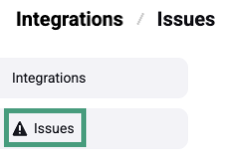
- Click Issues in the left navigation panel.
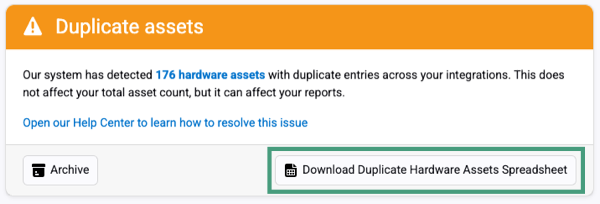
- Look for the Duplicate assets alert under Active Issues and click Download Duplicate Hardware Assets Spreadsheet.
Review the spreadsheet
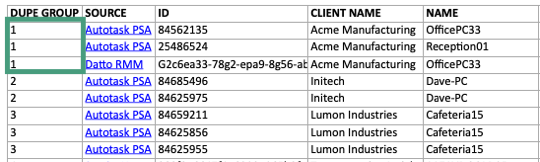
- Open the spreadsheet to see a list of asset records grouped by duplicates i.e Dupe Groups.
Dupe Groups
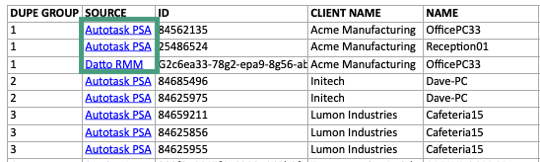
- Each row in the spreadsheet is a separate record, syncing from one of your integrations. Rows with the same number in the Dupe Group Column represent the same asset.
- Each Dupe Group represents a single grouped asset in Lifecycle Manager.
Source
- The Source column shows which integration the asset record syncs from.
- The Source column often includes a direct link to the asset within the integration, making it very fast to navigate to the culpable record for resolution (note: not all integrations support this).
- If you see two or more rows with the same Dupe Group and Source, that indicates a duplicate syncing in from the integration.
Name and serial
Use these fields to identify and compare records in your integrated tools.
- If the Dupe Group number and Source, and Serial on a row are identical, there are multiple instances of the same asset syncing from one integration.
- If there is no serial, but the dupe group number and source are the same, check the Client Name and Name fields. Assets from the same client that have an exact matching name can trigger duplication.
- If neither of the above applies, the records may share a MAC address. Search for the asset by Name in your integration and verify that each record has a unique MAC address.
Clean up duplicates in your integrations
- For each Dupe Group, determine which duplicate asset is problematic/stale.
- If you feel it needs to be resolved, then find the record(s) in your integration - the direct link to the record in the Source column can help you do this quickly (if one exists).
- Delete or archive the duplicate in your integration.
Repeat this process for all Dupe Groups in the spreadsheet.
Sync Lifecycle Manager
- Go to Settings > Integrations
- Click the Sync Now icon in the top-right corner
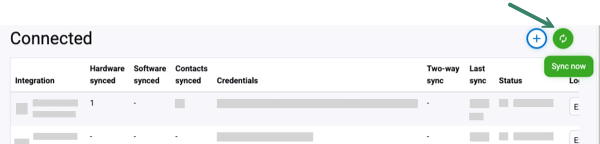
Once the fresh sync is complete, check the Issues page to confirm that the duplicate alert is resolved.
Any questions?
Reach out to our Lifecycle Manager support team by submitting a support ticket.
:sparkles: NEW :sparkles:
Join our MSP Power-Ups - Free 15-minute micro-workshops + live Q&A with our Lifecycle Manager experts. Sign up here to reserve your spot.